Project Management Software Pricing Guide · Updated September 2026
monday.com Pricing (2026): Plans, Costs & What You’ll Actually Pay
monday.com Work Management has a free plan and four paid tiers, but your real cost depends on plan level, billing cycle, minimum seat requirements, team size, feature limits, automation and integration usage, guest needs, reporting depth and optional AI usage. This 2026 pricing guide shows what each plan costs, which upgrade triggers matter and which tier is the best fit for different teams.
Quick Verdict
Standard is the strongest starting point for most growing teams
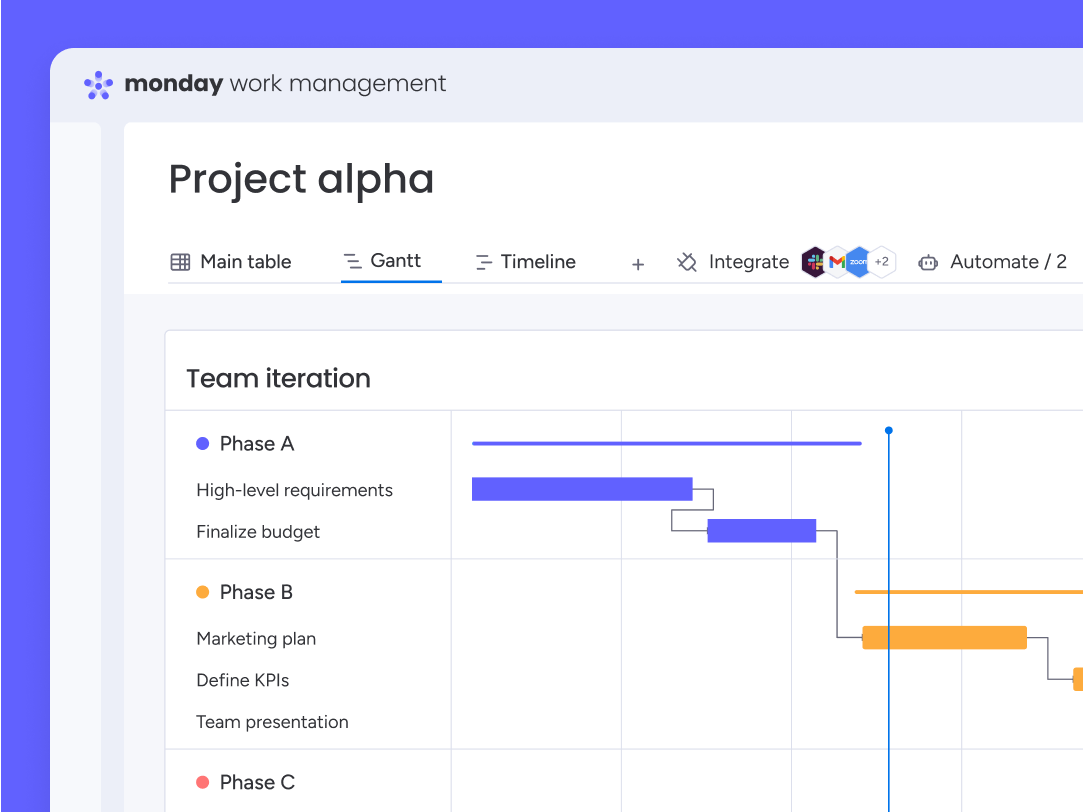
Basic works for simple board-based tracking, but Standard is where monday.com becomes a more complete work-management platform through Timeline and Gantt views, Calendar, guest access, automations, and integrations. Pro is most worthwhile when higher usage limits, advanced workflows, and reporting solve a specific operational need.
Ready to test monday.com?
Start with the platform directly, or review the full feature and fit analysis first.
monday.com Pricing at a Glance
For monday Work Management, current annual-billing rates start at $9 per seat per month for Basic, $12 for Standard, and $19 for Pro. Enterprise is custom priced. The Free plan supports up to two seats, while paid plans require at least three seats.
| Plan | 2026 price* | Best for | Important consideration |
|---|---|---|---|
| Free | $0 | Individuals or two-person teams testing basic work management | Up to 2 seats and 3 boards |
| Basic | $9/seat/month | Teams needing straightforward boards and work tracking | Minimum 3 paid seats; limited advanced workflow features |
| Standard | $12/seat/month | Most growing teams needing Gantt, calendar, guests and automation | 250 automation and 250 integration actions per month |
| Pro | $19/seat/month | Teams needing advanced workflows, reporting and higher usage limits | Higher cost, but substantially more operational depth |
| Enterprise | Custom quote | Large organizations needing governance, security and scale | Custom pricing and a minimum 12-month Enterprise term |
*USD list pricing shown for annual billing and subject to location, taxes, promotions and vendor changes. Confirm final pricing with monday.com before purchase.
Which monday.com Plan Do You Actually Need?
Use the requirement that is most likely to drive your upgrade decision—not just the lowest advertised seat price.
| Buyer requirement | Best starting plan | Why |
|---|---|---|
| Personal use or testing | Free | Best for individuals or very small teams that want to explore boards, docs and templates before paying. |
| Basic boards and task tracking | Basic | Suitable when centralized work tracking is the main need and advanced views, automations or integrations are not yet required. |
| Timeline, Gantt and Calendar views | Standard | Standard is the first tier where monday.com becomes a more complete visual work-management platform. |
| External guest collaboration | Standard | Best starting point when client, contractor or stakeholder collaboration matters. |
| Light automations and integrations | Standard | Includes monthly automation and integration capacity suitable for lighter workflow use. |
| Advanced workflows and reporting | Pro | Better fit when the team needs deeper operational controls, reporting and more workflow capacity. |
| Higher automation/integration usage | Pro | More appropriate when Standard's usage limits become a recurring constraint. |
| Enterprise security, governance and scale | Enterprise | Best for larger organizations that need advanced governance, security, portfolio controls and tailored support. |
Compare Business Software & Choose With Confidence
Explore expert software reviews, side-by-side comparisons, buyer's guides, pricing insights, and practical selection resources to evaluate solutions across project management, HR and payroll, accounting automation, workflow automation, collaboration, and more.


We’ve partnered with Software Advice to help you make better software decisions.
PMWorld360 works with Software Advice to help software buyers compare solutions, evaluate requirements, and access expert-assisted guidance when choosing software for their organization.
Not sure which platform fits your team? Compare leading project management software, evaluate your requirements, and make a more informed buying decision.
What monday.com Actually Costs by Team Size
These examples use the current annual-billing list rates and illustrate why seat count and plan choice matter. Taxes, optional products and add-ons are not included.
Standard: $36/month
Pro: $57/month
Standard: $120/month
Pro: $190/month
Standard: $300/month
Pro: $475/month
Standard: $600/month
Pro: $950/month
Examples assume annual billing at $9, $12 and $19 per seat per month respectively. Actual checkout totals can vary with billing country, team-size purchasing rules, promotions and add-ons.
Which monday.com Plan Is Best for Your Team?
Free
Best for individuals and very small teams exploring the platform. It includes basic boards, docs and templates, but it is not designed for a growing operational team.
Basic
Best for teams that mainly need centralized work tracking, unlimited items and simple boards. It is inexpensive, but teams needing Gantt views, integrations or automation will outgrow it quickly.
Standard
Best value for many growing teams. Standard adds Timeline and Gantt views, Calendar, guest access, plus 250 monthly automation and integration actions.
Pro
Best for teams with more advanced workflow, reporting and operational requirements. The price jump is meaningful, so upgrade when the additional controls and usage capacity solve a real constraint.
Enterprise
Best for organizations requiring enterprise security, governance, portfolio and resource management, large-scale automations and integrations, advanced analytics and tailored support.
monday.com Hidden Costs, Plan Limits and Upgrade Triggers
- Paid plans start at three seats. A one- or two-person team that needs paid features may still face the paid-plan minimum.
- Annual billing is cheaper. monday.com currently advertises an 18% saving for annual billing compared with monthly billing.
- Feature gates can matter more than seat price. Gantt, Calendar, guest access, automations and integrations begin on Standard, while more advanced reporting, workflow and governance capabilities sit higher.
- Usage limits can trigger upgrades. Automation, integration, dashboard and other limits vary by plan, so teams should estimate real monthly workflow volume before choosing a tier.
- AI can affect total cost. Current plans include different AI credit allowances, with additional credits available for purchase.
- Enterprise is not simply a per-seat list price. Pricing is quote-based and the Enterprise plan carries a minimum 12-month term.
Basic vs Standard: Is Standard Worth the Extra Cost?
For many buyers, this is the first meaningful upgrade decision. Basic is inexpensive, but Standard is where several work-management features begin to change how teams plan and collaborate.
Choose Basic if:
- You mainly need boards, items and straightforward task tracking
- Your workflows do not depend on Gantt, Timeline or Calendar views
- You do not need regular guest collaboration
- You can operate without built-in automation and integration capacity
Choose Standard if:
- You need Timeline, Gantt or Calendar views
- You collaborate with external guests
- You want light automations and integrations
- You need a more complete work-management platform rather than simple board tracking
Is Standard or Pro the Better Value?
Choose Standard if:
- You need Gantt, Timeline and Calendar views
- You collaborate with external guests
- Your automation and integration usage is relatively light
- You want the strongest balance of cost and workflow capability
Choose Pro if:
- Your workflows require more advanced controls or reporting
- You need higher automation and integration capacity
- Your team relies on monday.com as a core operating platform
- The productivity gain justifies the $7-per-seat monthly annual-billing premium over Standard
monday.com Hidden Costs and Limitations to Model Before You Buy
monday.com is not unusually opaque for SaaS software, but the headline per-seat price does not tell the whole story. Model your expected team size and required features before choosing a plan.
Seat requirements
Paid plans require at least three seats, and the available purchasing increments at larger team sizes can affect the amount you actually pay.
Feature-driven upgrades
A team may choose Standard or Pro not because of headcount, but because a required view, reporting capability, permission level or workflow limit is unavailable below it.
Automation and integrations
Teams running high-volume automated workflows should estimate monthly actions before choosing a tier rather than relying only on the base subscription price.
AI and additional products
AI credits and other monday.com products can change the total account cost. Treat the Work Management subscription as the starting point, not necessarily the full software budget.
Guest and collaboration requirements
If external collaborators are central to your workflow, confirm the guest model and plan requirements before choosing a lower-cost tier.
Reporting and governance needs
Teams that need deeper reporting, permissions, security or governance can be pushed toward higher tiers even when their seat count is modest.
monday.com Pricing FAQs
How much does monday.com cost in 2026?
For monday Work Management, the Free plan costs $0 for up to two seats. With annual billing, Basic starts at $9 per seat per month, Standard at $12, and Pro at $19. Enterprise uses custom pricing.
Does monday.com have a free plan?
Yes. The monday Work Management Free plan supports up to two seats and includes up to three boards, docs, templates and basic work-management functionality.
What is the minimum number of paid seats?
monday.com states that paid plans require a minimum of three seats. Buyers should also confirm the exact seat options shown for their team size during checkout.
Is monday.com cheaper with annual billing?
Yes. monday.com currently advertises savings of 18% when choosing annual rather than monthly billing.
Is monday.com Standard worth it over Basic?
Standard is usually worth the higher price when your team needs Timeline or Gantt views, Calendar, guest collaboration, automations or integrations. Basic is better when simple board and task tracking is enough.
How much does monday.com cost for 10 users?
Using the annual-billing list rates shown in this guide, a 10-person team would cost about $90 per month on Basic, $120 on Standard or $190 on Pro, before taxes, promotions, add-ons or other products.
How much does monday.com cost for 50 users?
Using the annual-billing list rates shown in this guide, a 50-person team would cost about $450 per month on Basic, $600 on Standard or $950 on Pro, before taxes, promotions, add-ons or other products.
Which monday.com plan is best for most teams?
Standard is often the strongest starting point for growing teams because it adds Gantt and Timeline views, Calendar, guest access, automations and integrations. Pro is better when advanced workflow needs and higher usage limits justify the additional cost.
Does monday.com charge extra for AI?
Current plans include different AI credit allowances, and additional credits can be purchased. Teams expecting significant AI usage should include this in their total-cost estimate.
Final Verdict: Is monday.com Worth the Price in 2026?
For most growing teams, Standard offers the clearest balance of price and capability. Basic is better for simple work tracking, while Pro makes sense when advanced workflows and higher usage limits create enough operational value to justify the higher per-seat cost.
The key is to price monday.com against the features and usage your team actually needs—not the lowest advertised plan.