Best for
Growing, cross-functional, remote, hybrid, agency, operations, and project teams managing multiple workflows or replacing overlapping work-management tools.
ClickUp is a highly customizable project and work management platform for teams that want to consolidate projects, tasks, Docs, dashboards, automation, collaboration, and AI in one flexible workspace. Its biggest strength is breadth and configurability; its biggest tradeoff is the setup and governance required to keep that flexibility manageable. In this 2026 ClickUp review, we assess features, AI and automation, pricing and value, strengths and limitations, and the teams most likely to benefit so buyers can decide whether ClickUp is the right fit before committing to a rollout.
PMWorld360 rating: 9.6/10. ClickUp is a strong fit for teams that want to consolidate project management, documentation, dashboards, automation, collaboration, and AI-assisted workflows in one configurable platform. Its biggest advantage is breadth and flexibility; its biggest tradeoff is the setup, adoption, and governance required to use that flexibility well.
Growing, cross-functional, remote, hybrid, agency, operations, and project teams managing multiple workflows or replacing overlapping work-management tools.
You value deep customization, automation, shared visibility, integrated Docs and dashboards, and the ability to consolidate several work-management functions.
Your team wants an extremely simple, highly opinionated task-management experience, needs a specialized operational system, or is unlikely to maintain workspace standards.
Plan limits, AI add-on costs, integration depth, migration effort, training, administrative ownership, and whether your team will use enough of the platform to justify consolidation.
ClickUp’s value comes from breadth and flexibility, but those same qualities can create complexity. For buyers weighing ClickUp’s strengths, weaknesses, opportunities, and tradeoffs, the key question is whether your team will use that flexibility productively without creating unnecessary administrative overhead.
ClickUp is strongest when teams need to standardize work, consolidate fragmented tools, improve cross-functional visibility, or build repeatable workflows. The main consideration is governance: clear conventions for Spaces, Lists, statuses, fields, automations, and ownership are essential as adoption grows.
Before choosing a platform, it’s helpful to compare ClickUp against other leading project management solutions. Here’s how it stacks up in functionality, flexibility, and value.
| Feature | ClickUp | Monday.com | Asana | Notion |
|---|---|---|---|---|
| Project & Task Management | ✔ Advanced | ✔ Strong | ✔ Strong | ➖ Basic |
| Docs & Knowledge Base | ✔ Integrated Docs | ➖ Limited | ➖ Limited | ✔ Excellent |
| Automation | ✔ Advanced & scalable | ✔ Good | ➖ Limited | ➖ Minimal |
| AI Features | ✔ Broad AI capabilities | ✔ AI capabilities | ✔ AI capabilities | ✔ AI capabilities |
| Customization | ✔ Very high | ✔ Moderate | ➖ Limited | ➖ Moderate |
| Best For | Growing & scaling teams | Visual teams & small businesses | Simple task management | Documentation-heavy teams |
If you are still comparing platforms, use the buyer resource below to see how ClickUp compares with Notion and Zoho Projects before committing to a plan.
See how Zoho Projects, Notion, and ClickUp compare based on software ratings and key considerations. Download the free 2026 comparison guide from Software Advice to help narrow down which platform may be the best fit for your team.

Sponsored resource from Software Advice.
ClickUp is a work management platform that brings project planning, task execution, documentation, collaboration, dashboards, whiteboards, reporting, time tracking, automation, and AI-assisted workflows into one environment.
For project teams, the practical appeal is consolidation. Instead of managing work in one tool, documentation in another, status reporting in spreadsheets, and recurring processes through manual follow-up, ClickUp can connect many of those activities inside the same workspace.
Depending on how a team configures it, ClickUp can replace or reduce reliance on:
ClickUp can handle straightforward to-do lists, but its real strength is managing work that requires multiple owners, statuses, dependencies, priorities, due dates, subtasks, custom fields, recurring tasks, and different ways of viewing the same underlying work.
This makes ClickUp useful for teams managing different types of work in the same platform. A marketing team, PMO, operations group, agency, and product team can all use different workflows without requiring separate systems.
Teams are not locked into a single project-management methodology. The same work can be viewed in formats that support operational execution, agile delivery, timeline planning, capacity management, and executive oversight.
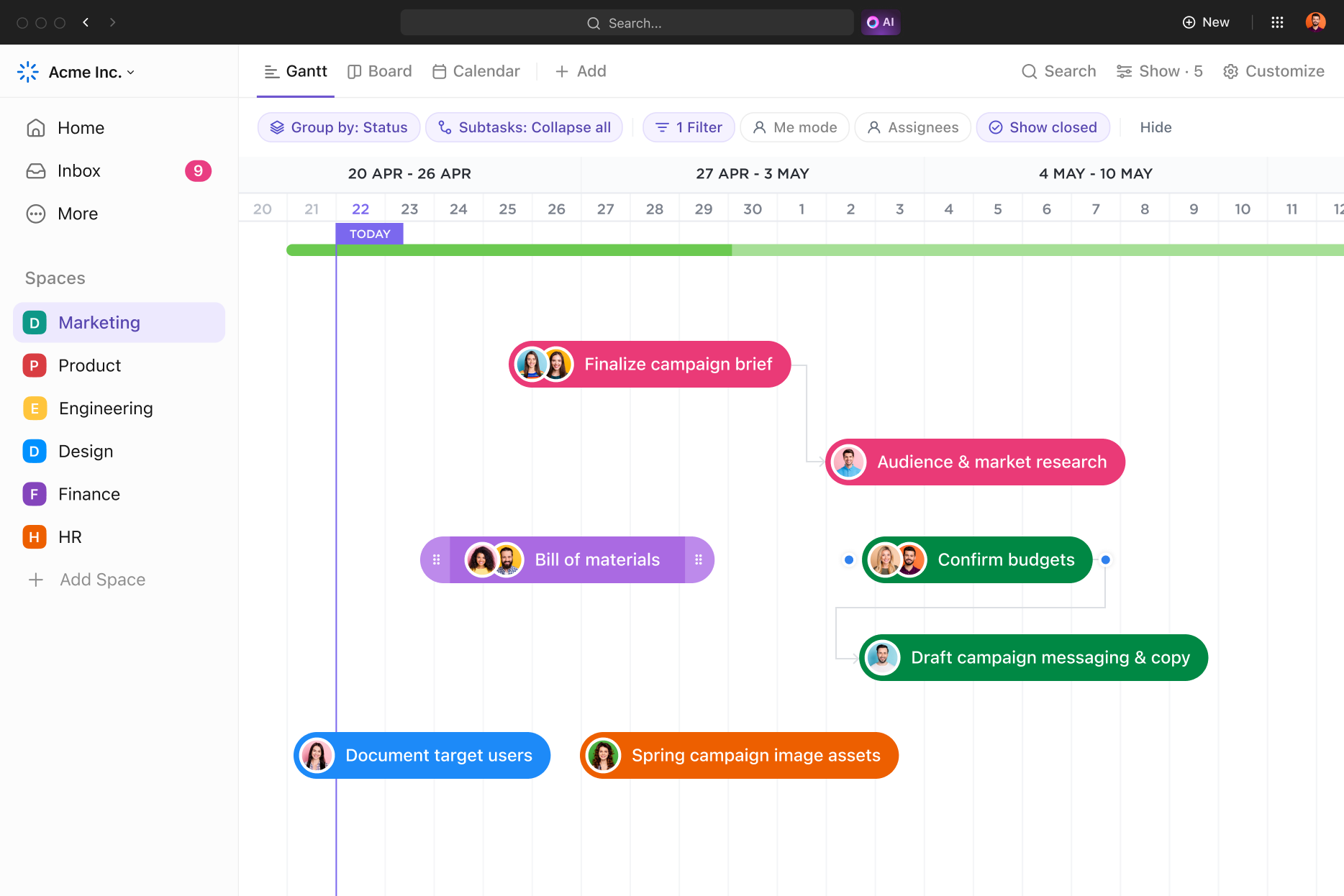
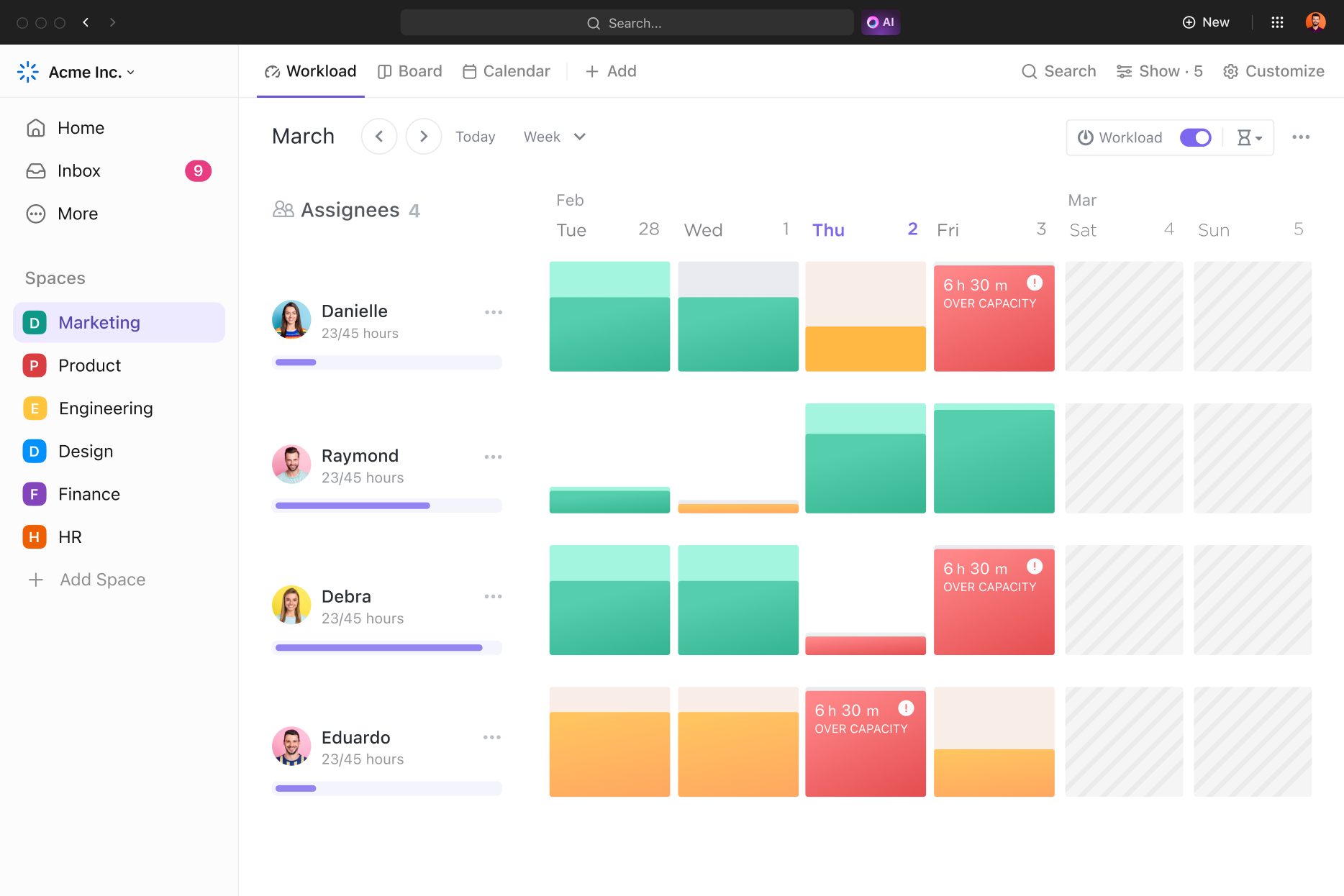
That flexibility is particularly valuable for hybrid organizations where executives, project managers, contributors, and functional teams need different views of the same work.
ClickUp can support agile, waterfall, hybrid, recurring operational work, client delivery, and many custom methodologies because teams can configure statuses, views, fields, dashboards, templates, permissions, and automations around the way work actually moves.
The benefit is flexibility. The risk is over-customization. Teams should resist the temptation to create too many statuses, fields, views, or nested structures before they understand what users actually need.
ClickUp is not limited to task tracking. Teams can connect documentation and visual collaboration directly to the work being managed, which can reduce context switching and make project knowledge easier to find.
Remote and hybrid teams often struggle when project updates, decisions, documentation, and task ownership are spread across multiple tools. ClickUp can centralize much of that information so teams have a clearer shared view of what is happening.
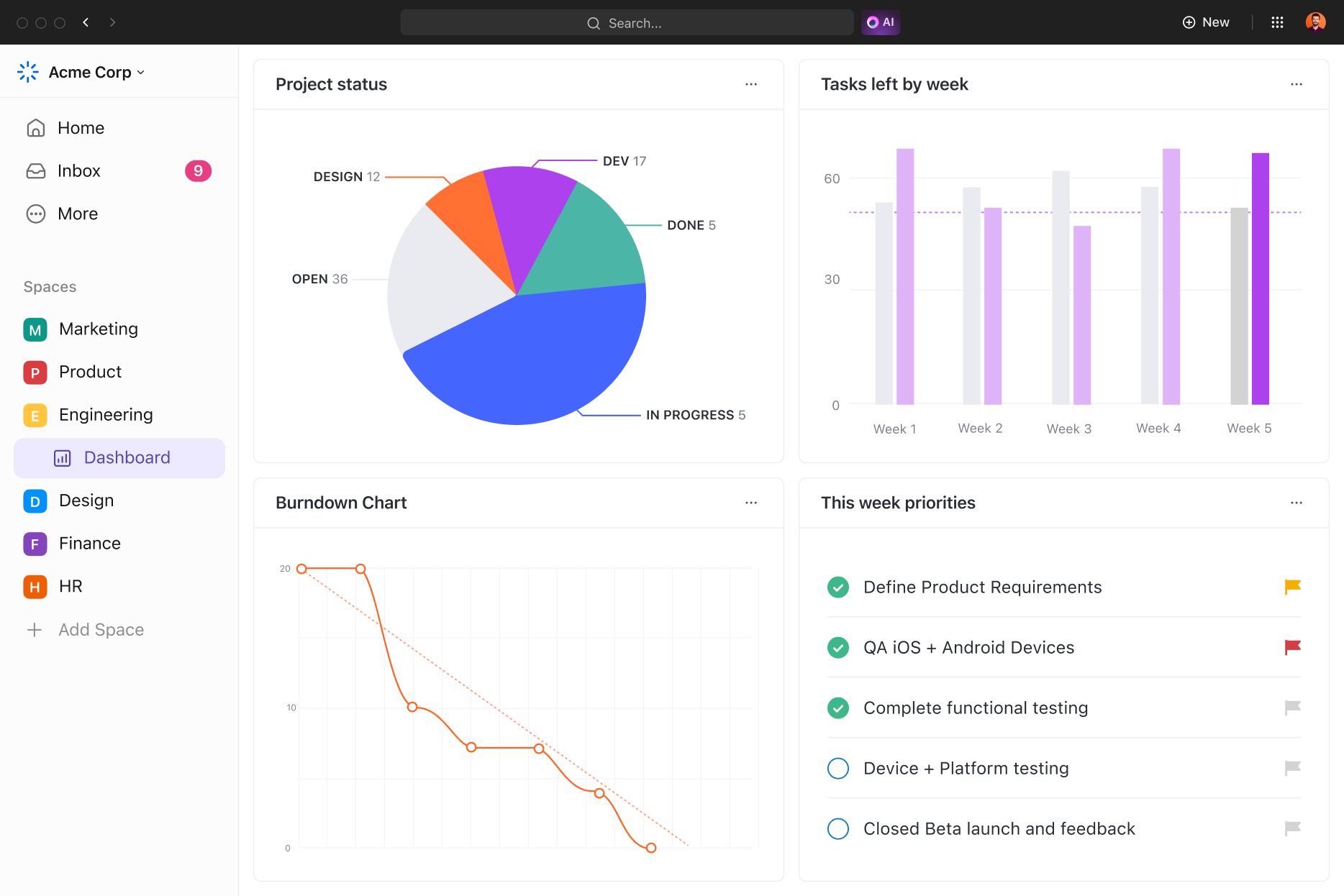
ClickUp can support project managers who need to understand not only what work is planned, but also what is slipping, where capacity is constrained, and how actual effort compares with expectations.
Automation is one of ClickUp’s strongest capabilities for teams running repeatable workflows. Rules can reduce manual handoffs, improve consistency, and help work move forward without requiring someone to remember every administrative step.
The biggest automation opportunity is not simply saving clicks. It is standardizing processes so important steps are less likely to be missed as teams grow.
ClickUp Brain brings AI into the context of the work already stored across tasks, Docs, conversations, and connected information. For project managers and teams, that can make AI more useful than a standalone writing tool because the system can assist with work that is already part of an active project environment.
Practical project-management use cases include drafting status updates, summarizing long task threads, turning meeting notes into action items, identifying follow-up work, generating first drafts of project documentation, and helping teams locate information buried across a large workspace.
Who gets the most value: teams that already manage a meaningful amount of their projects, documentation, and communication inside ClickUp are more likely to benefit from context-aware AI assistance.
Main limitation: AI capabilities, access, usage limits, and add-on terms can vary by plan and may change. Buyers should confirm the specific AI functions they expect to use instead of assuming every AI feature is included by default.
ClickUp is most valuable when it connects cleanly with the tools your team already uses. Buyers should evaluate integrations not just by whether a connector exists, but by what data can move between systems, whether synchronization is one-way or two-way, and whether the integration is available on the plan you are considering.
| Integration Area | Examples to Evaluate | Why It Matters |
|---|---|---|
| Communication | Slack, Microsoft Teams | Keep task updates and team conversations connected instead of creating another information silo. |
| Calendars & Productivity | Google Calendar, Microsoft ecosystem | Helps teams connect scheduled work, meetings, and project commitments. |
| Cloud Storage | Google Drive, Dropbox, Box, OneDrive | Makes project files easier to access without forcing teams to migrate every document. |
| CRM & Business Systems | HubSpot and other workflow integrations | Useful when project delivery starts from sales, customer, or operational processes. |
| Automation & Custom Connections | Zapier, Make, API, webhooks | Extends ClickUp when a native integration does not cover a required workflow. |
Buyer tip: before migrating, list the five systems your team cannot operate without and test the exact workflow you need in a trial Workspace. Integration depth can matter more than the raw number of available connectors.
For larger organizations, selecting project management software is also an identity, permissions, governance, and compliance decision. ClickUp supports enterprise-oriented controls, but availability varies by plan and buyers should confirm the exact requirements that matter to their organization.
| Area | What to Evaluate | Buyer Consideration |
|---|---|---|
| Authentication | Google/Microsoft SSO, SAML/Okta options | Confirm which SSO method and plan match your identity-management requirements. |
| User Provisioning | SCIM and user-management controls | Important for larger organizations managing onboarding, role changes, and offboarding at scale. |
| Permissions & Governance | Custom permissions, roles, guest controls, private spaces | Helps prevent a flexible Workspace from becoming difficult to govern. |
| Security & Compliance | 2FA, data residency, security certifications and compliance options | Verify requirements with your security or procurement team before enterprise rollout. |
Enterprise fit: ClickUp becomes more compelling when flexibility is paired with deliberate governance. Define Workspace ownership, permission standards, external-guest rules, and administrative responsibilities before scaling adoption across departments.
ClickUp offers a Free Forever plan plus Unlimited, Business, and Enterprise tiers. The right choice depends less on the lowest advertised price and more on the controls, reporting, automation, guest access, security, and AI capabilities your team actually needs.
| Plan | Published Price* | Best For | What to Watch |
|---|---|---|---|
| Free Forever | $0 | Individuals and small teams evaluating ClickUp or managing simpler workflows. | Feature and usage limits may become restrictive as workflows mature. |
| Unlimited | $7/user/month when billed yearly |
Small teams that need broader storage, integrations, and core work-management functionality. | Check reporting, automation, permissions, and guest-seat requirements before standardizing. |
| Business | $12/user/month when billed yearly |
Mid-sized teams needing stronger operational controls, reporting, automation, and collaboration. | Confirm whether your security, SSO, governance, and advanced admin needs require Enterprise. |
| Enterprise | Custom pricing | Larger organizations with advanced security, administration, governance, support, and procurement requirements. | Model implementation, admin ownership, training, and governance costs in addition to license price. |
*Published ClickUp pricing checked August 16, 2026. Pricing, billing terms, plan limits, promotions, and feature availability can change; confirm current terms with ClickUp before purchasing.
ClickUp also sells optional AI capabilities separately from the core Workspace plans. As of August 16, 2026, ClickUp lists Brain AI at $9 per user/month and Everything AI at $28 per user/month. AI plans include different usage allowances and advanced capabilities, so teams should estimate AI adoption separately rather than assuming it is included in the base software price.
Unlimited is the practical starting point for many small teams that have outgrown the free plan. Business makes more sense when reporting, automation, guest collaboration, and operational scale become more important. Enterprise should be evaluated when identity management, governance, security controls, procurement, or large-scale administration drive the decision.
Value perspective: ClickUp tends to deliver the strongest ROI when it replaces multiple overlapping tools or reduces manual coordination. A low per-seat price is less valuable if the Workspace is poorly configured, adoption is weak, or teams continue paying for systems ClickUp was intended to consolidate.
ClickUp's fit depends less on company size alone than on workflow complexity, consolidation goals, governance capacity, and the type of work your team manages. Use this matrix to identify where ClickUp is strongest and where a more specialized or simpler platform may deserve comparison.
| Buyer Situation | Fit | Why | What to Validate |
|---|---|---|---|
| Small team replacing basic task tools | Strong | More room to scale without immediately changing platforms. | Whether the team needs ClickUp's breadth or would prefer a simpler interface. |
| Agency or consultancy managing clients | Strong | Templates, automation, time tracking, dashboards, and repeatable client workflows can live together. | Guest access, permissions, reporting, and client-facing workflow requirements. |
| Cross-functional operations team | Strong | Flexible workflows and shared visibility can replace fragmented processes across departments. | Workspace standards, ownership, integrations, and adoption across functions. |
| PMO or multi-project environment | Strong with governance | Dashboards, workload views, dependencies, custom fields, and portfolio visibility support complex delivery. | Standardization, reporting requirements, resource practices, and administrative ownership. |
| Enterprise-wide rollout | Evaluate carefully | ClickUp can scale, but identity, permissions, governance, migration, procurement, and support requirements become decisive. | SSO, provisioning, compliance, data requirements, guest rules, and rollout governance. |
| Very small team wanting simple tasks | Mixed | ClickUp may provide more configuration and functionality than the team needs. | Whether simplicity is more valuable than future flexibility. |
| Documentation-first organization | Compare | ClickUp Docs connect knowledge to work, but a knowledge-first platform may better match the primary use case. | Depth of knowledge management, publishing, search, and documentation workflows. |
| Team unwilling to standardize or train | Weak | ClickUp's flexibility can become friction when no one owns structure, conventions, or adoption. | Whether the organization is prepared to assign ownership and phase the rollout. |
Per-user pricing is only one part of the buying decision. A realistic ClickUp cost model should include the effort required to migrate, configure, govern, integrate, train, and administer the Workspace—then compare those costs with the tools and manual processes ClickUp may replace.
| Cost Area | What Buyers Should Account For | Decision Question |
|---|---|---|
| Core licenses | Users, plan tier, guests, and required controls. | Which users genuinely require paid access and which plan contains the capabilities they need? |
| AI | Expected AI users, selected AI tier, usage allowances, and changing add-on terms. | Which workflows will produce enough value to justify AI cost? |
| Migration | Data cleanup, imports, workflow rebuilding, validation, and legacy-system transition. | What must move, what can be archived, and who owns migration quality? |
| Configuration | Workspace architecture, statuses, fields, templates, dashboards, permissions, and automations. | How much setup is required before the Workspace is usable and governable? |
| Training & adoption | Administrator, manager, contributor, and team onboarding. | How will different user groups learn the workflows they actually need? |
| Integrations | Native connectors, third-party automation, API work, and ongoing maintenance. | Can ClickUp support the critical workflows between systems without creating new manual work? |
| Administration & governance | Ongoing ownership, permissions, standards, cleanup, templates, and change control. | Who is accountable for keeping the Workspace usable as adoption grows? |
| Tool consolidation savings | Subscriptions, duplicate processes, manual reporting, and coordination effort that may be retired. | Which existing costs can realistically be eliminated—not merely duplicated? |
Buyer takeaway: a lower per-seat price does not automatically produce a lower total cost of ownership. ClickUp's value improves when the organization actually retires overlapping tools, reduces manual coordination, and governs the Workspace well.
Features create value only when the organization uses them in a way that changes how work is planned, coordinated, measured, or governed. The table below connects ClickUp capabilities to potential business outcomes and the conditions required to realize them.
| Buyer Objective | Relevant ClickUp Capability | Potential Outcome | What Has to Be True |
|---|---|---|---|
| Reduce tool sprawl | Tasks, Docs, dashboards, whiteboards, collaboration, automation, AI | Fewer disconnected work-management systems and less context switching. | Teams must actually consolidate workflows instead of running ClickUp alongside every legacy tool. |
| Improve project visibility | Dashboards, workload views, statuses, custom fields, reporting | Faster understanding of progress, bottlenecks, capacity, and ownership. | Teams must maintain reliable statuses, assignments, estimates, and project data. |
| Standardize delivery | Templates, custom statuses, fields, automations | More repeatable execution across projects, clients, or departments. | Standards must be intentionally designed and governed rather than allowing every team to configure independently. |
| Reduce manual handoffs | Automations, assignments, triggers, recurring workflows | Less administrative follow-up and fewer missed process steps. | Rules must reflect a stable workflow and be monitored as processes change. |
| Improve capacity decisions | Workload views, time estimates, assignments, reporting | Better conversations about over-allocation, priorities, and delivery risk. | Teams need consistent ownership and sufficiently accurate workload inputs. |
| Improve knowledge continuity | Docs, task context, comments, linked project information | Decisions and operating knowledge remain closer to the work they affect. | Teams must document important context and avoid moving critical decisions back into disconnected channels. |
| Accelerate status communication | Dashboards, activity data, summaries, AI-assisted updates | Less manual status chasing and faster stakeholder communication. | Underlying project data must be current enough for summaries and dashboards to be trusted. |
ClickUp is easiest to evaluate when buyers separate the software decision from the rollout decision. Before configuring every feature, confirm that the organization can answer these questions.
| Readiness Area | Question to Answer Before Rollout |
|---|---|
| Governance | Who owns Workspace architecture, naming standards, permissions, templates, and ongoing cleanup? |
| Workflow | Have you documented the representative workflows you want ClickUp to support before configuring statuses, fields, and automations? |
| Migration | Which data and processes must migrate, which can be archived, and how will migrated information be validated? |
| Integrations | Which systems are business-critical, and have you tested the exact data flow required between them and ClickUp? |
| Adoption | Which user groups need training, what do they need to do in ClickUp, and who will support them after launch? |
| Measurement | How will you know the rollout reduced tool sprawl, improved visibility, standardized work, or produced another intended outcome? |
Start with one representative workflow, a small set of essential fields and statuses, and the minimum views users need. Validate adoption and reporting before expanding automation, customization, or additional teams.
Our 2026 ClickUp review finds that ClickUp remains a compelling option for teams that need more than basic task management. Its biggest advantage is the ability to adapt one platform to many different project types, work methodologies, departments, and levels of reporting.
The tradeoff is complexity. ClickUp is not automatically better simply because it offers more features. Teams that succeed with it usually define a clear workspace structure, standardize how work moves through the system, and introduce advanced customization and automation gradually.
PMWorld360 evaluates project-management software from a software-buyer and project-delivery perspective. For this review, we assessed ClickUp across the areas that most directly affect selection and adoption: project and task management, customization and automation, reporting and visibility, collaboration and knowledge management, integrations and extensibility, ease of adoption, pricing and overall value.
Our assessment separates published product facts—such as plan structure, pricing and documented capabilities—from PMWorld360 editorial judgments about buyer fit, strengths, limitations, implementation considerations and value. Product details can change, so buyers should confirm plan-specific features, limits and current pricing with ClickUp before purchasing.
The 9.6/10 PMWorld360 rating is an overall editorial assessment based on the evaluation areas below. The score represents PMWorld360's overall editorial assessment across the evaluation areas below rather than a mechanically weighted formula. The score reflects ClickUp's unusually broad work-management capabilities while accounting for the learning curve, setup effort and governance required to use that flexibility well.
| Evaluation Area | PMWorld360 Assessment | Buyer Implication |
|---|---|---|
| Project & task management | Excellent depth for simple through complex workflows. | Strong fit for teams that need more than basic task lists and want multiple ways to plan, assign and track work. |
| Customization & automation | One of ClickUp's strongest differentiators, especially for cross-functional teams. | High flexibility can replace fragmented workflows, but teams should standardize configurations to avoid unnecessary complexity. |
| Reporting & visibility | Strong dashboards, workload views, status visibility, and operational reporting. | Useful for project leaders and managers who need shared visibility across work, capacity and progress. |
| Collaboration & knowledge | Docs, comments, whiteboards, and shared project context can reduce tool switching. | Most valuable when teams intentionally connect documentation, decisions and collaboration to active work. |
| Integrations & extensibility | Strong integration options plus API and automation paths for custom workflows. | Buyers should verify the depth—not just the existence—of integrations required by their operating stack. |
| Ease of adoption | Good once configured, but the breadth of options creates a meaningful learning curve. | Teams wanting a minimal, highly opinionated interface may prefer a simpler alternative; phased implementation can reduce adoption friction. |
| Pricing & overall value | Excellent potential value when teams use ClickUp to consolidate tools and actively govern the Workspace. | Evaluate total fit and required capabilities rather than choosing solely on the lowest advertised per-user price. |
Explore expert software reviews, side-by-side comparisons, buyer's guides, pricing insights, and practical selection resources to evaluate solutions across project management, HR and payroll, accounting automation, workflow automation, collaboration, and more.


PMWorld360 works with Software Advice to help software buyers compare solutions, evaluate requirements, and access expert-assisted guidance when choosing software for their organization.
Not sure which platform fits your team? Compare leading project management software, evaluate your requirements, and make a more informed buying decision.
Use these questions to pressure-test fit before committing to a rollout:
Treat this as a decision diagnostic, not a score. A strong ClickUp fit requires both useful capabilities and organizational readiness to implement them well.
ClickUp offers a Free Forever plan for individuals and teams that want to start with core work-management capabilities. Feature limits and access differ from paid plans.
Yes. ClickUp supports task planning, dependencies, multiple views, dashboards, workload visibility, time tracking, documentation, automation, and other capabilities used by project teams. Its flexibility is a major strength, although teams should avoid overcomplicating the initial setup.
Its biggest strengths are flexibility, customization, broad project-management functionality, automation, and tool consolidation. Its biggest weaknesses are the learning curve and the governance required to keep a large workspace organized. The biggest opportunity is consolidating fragmented workflows and improving cross-functional visibility; the tradeoff is the setup discipline required to keep that flexibility manageable.
Yes. ClickUp Brain and related AI capabilities can support summaries, writing, project updates, research, task assistance, AI Fields, and agent-style workflows. Availability and limits vary by plan, role, add-on, and current product terms.
It can be a strong fit because work, documentation, comments, dashboards, and workflow status can be centralized. The benefit depends on teams consistently using the platform as a shared operating system rather than maintaining fragmented processes elsewhere.
In some organizations, yes. ClickUp overlaps with parts of those categories, but replacement decisions should be based on the specific workflows, integrations, depth, and user experience your team requires.
For teams that want a highly customizable platform combining project management, documentation, automation, time tracking, dashboards, and AI capabilities, ClickUp can offer strong value. It is best suited to teams willing to invest some time in setup and workspace governance. Teams that prefer a simpler, more opinionated tool may find its flexibility and range of options more than they need.
Get practical insights on project management, AI, work technology, software evaluation, and modern operating practices. Stay ahead of the tools and trends shaping how teams plan, collaborate, and deliver results.
Subscribe Now →